
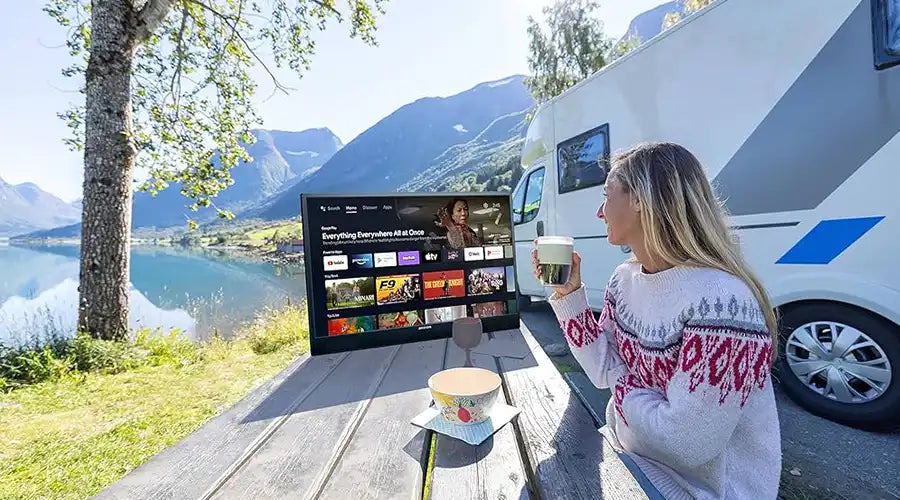
In 2026, the line between devices is becoming less obvious, but when it comes to personal entertainment and productivity, the choice still often comes down to two categories: the portable TV and the portable monitor.
Although they may look similar, especially in the popular 14 to 20-inch size range, they are built for very different purposes. One is designed as a self-contained entertainment device, while the other functions primarily as an external display for another system. Choosing the wrong one can lead to unnecessary cost, inconvenience, and disappointment.
1. What Is a Portable TV?
A portable TV, sometimes called a compact television or portable television, is a standalone media device. Unlike a monitor, it is built to operate independently without needing a laptop, desktop, or game console just to deliver core entertainment functions.
In modern product categories, portable TVs commonly include the following features:
- Built-in operating systems: Smart interfaces such as Android TV, Google TV, or similar embedded platforms.
- Integrated speakers: Audio hardware designed for direct media playback.
- Battery-powered use: Built-in rechargeable battery options for cordless viewing.
- Tuner support: Digital tuner capability for receiving local broadcast channels through an antenna where supported.
2. What Is a Portable Monitor?
A portable monitor, also known as a mobile monitor or external display, is essentially a screen panel intended to extend or mirror another device. It is not usually designed as a complete entertainment product on its own.
Most portable monitors do not include a full operating system, often provide limited or weak audio performance, and usually depend on power from USB-C or an external adapter. Their core role is productivity, not standalone media consumption.

3. Portable TV vs Portable Monitor: Key Differences
This is the most important part of the decision. While the two products may appear similar externally, their internal design priorities are very different.
Feature Comparison
| Feature | Portable TV | Portable Monitor |
|---|---|---|
| Built-in operating system | Yes | No |
| Integrated speakers | Yes | Often limited or absent |
| Remote control | Usually yes | Usually no |
| HDMI and USB input support | Yes | Yes |
| Battery option | Common | Less common |
| Standalone use | Yes | No |
4. Which One Is Better for Home Use?
For home use in places such as kitchens, bedrooms, dorm rooms, or rental apartments, the portable TV is generally the better option for entertainment-focused users.
The main reason is convenience. A portable TV can connect to power or run on battery, join Wi-Fi, and stream content directly. A portable monitor, by contrast, usually requires another device to provide both content and system control. That means more cables, more setup time, and less simplicity in casual daily use.
5. Which One Is Better for Travel and Outdoor Use?
For camping, RV travel, outdoor leisure, or emergency preparedness, a portable TV usually offers a more complete experience.
- Battery life: Portable TVs are often designed to power both display and audio without extra equipment.
- Less gear: A portable TV can reduce the need to carry a laptop, speaker, and multiple adapters.
- Broadcast access: If the model includes tuner support and antenna compatibility, local news or weather may still be available even without Wi-Fi.

6. Size Matters: 14–20 Inch Comparison
The 14 to 20-inch range is a popular balance point between portability and comfort. The experience changes noticeably as the size increases.
14–16 Inch: Daily Portable Viewing
At this size, a 14-inch or 16-inch portable TV is compact enough for bedside use, travel bags, and small tables. Portable monitors are also common in this range, but for standalone viewing, a TV typically provides a better all-in-one experience because it includes sound, controls, and built-in playback functionality.
18–20 Inch: Shared and Family Use
At 18 to 20 inches, the screen becomes better suited for shared viewing. A 20-inch portable TV can work well for small family use, RV interiors, or casual group watching. A monitor at this size may still be useful for work, but without smart features and integrated entertainment support, it is less practical as a standalone media device.
7. Cost Comparison in 2026
At first glance, a portable monitor may look like the lower-cost option. However, the total functional cost can be misleading if your goal is entertainment rather than productivity.
To make a portable monitor behave more like a TV, buyers often end up adding the following:
- The monitor itself
- A streaming stick or external media device
- An external speaker for acceptable sound
- A power bank or additional power solution
In practice, a seemingly inexpensive monitor setup can end up costing as much as, or more than, a dedicated portable TV that already includes these capabilities in one unit.
8. Common Buying Mistakes
Many disappointing purchases happen because buyers assume these two product types are interchangeable. Common mistakes include the following:
- Buying a monitor to stream like a TV: Without built-in software or strong audio, the experience may feel incomplete.
- Ignoring sound performance: Monitor audio is often minimal compared with a purpose-built portable TV.
- Overlooking cable dependence: Portable monitors often require a more complex setup than buyers expect.

9. Verdict: Which One Should You Choose?
The Verdict
Choose a portable TV if: You want a self-contained device for movies, sports, streaming, travel, kitchen use, or casual entertainment without relying on another computer.
Choose a portable monitor if: Your main priority is productivity and you need a second screen for work tasks such as spreadsheets, coding, presentations, or dual-screen laptop use.
10. Frequently Asked Questions
Can I use a portable monitor as a TV?
Yes, but it is usually less convenient. You will typically need an external streaming device and a separate speaker because most monitors do not include a smart operating system or strong built-in audio.
Do portable TVs require Wi-Fi to work?
Wi-Fi is usually needed for streaming applications, but some portable TVs can also work with local broadcast signals through tuner and antenna support, depending on the product design and market version.
What is the best size for a portable TV for camping?
A 14-inch or 16-inch portable TV is often a practical choice for camping because it balances portability, visibility, and battery-friendly operation.
Can I connect a game console to a portable TV?
Yes. Many portable TVs include HDMI input, making them compatible with game consoles and other external media devices.
Final Thoughts and Buyer Tips
In 2026, the portable TV has become more than a niche gadget. For entertainment-focused users, it offers a practical all-in-one solution that combines display, audio, control, and portability in one device. Whether you want a compact personal screen or a larger portable option for shared viewing, the key is to match the product type to the actual way you plan to use it.


コメントを書く
このサイトはhCaptchaによって保護されており、hCaptchaプライバシーポリシーおよび利用規約が適用されます。