
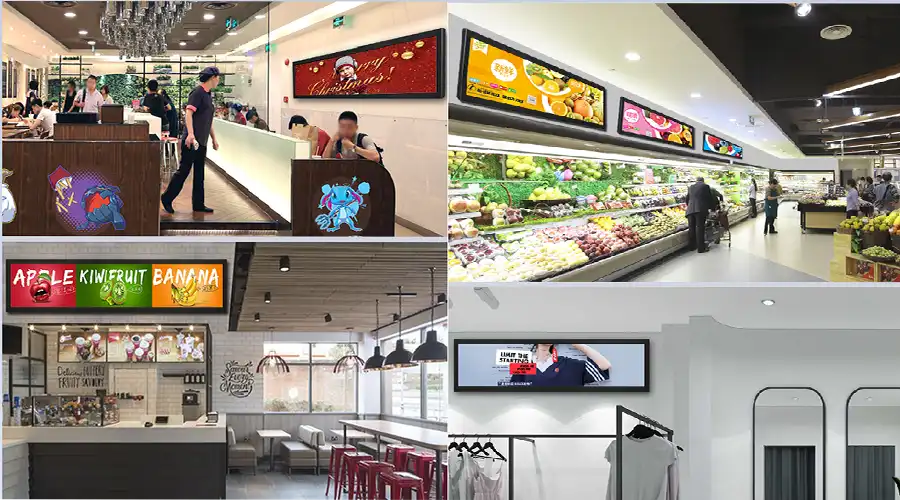
1. What Is a Stretched BAR LCD?
Stretched BAR LCD, also called bar-type LCD, ultra-wide LCD, or stretch display, is a liquid crystal display with a significantly wider aspect ratio than conventional 16:9 screens. By using specially manufactured elongated panels or precision-cut panels derived from standard mother glass, BAR LCDs create an extended display area for narrow installation spaces such as shelves, door headers, vehicle interiors, elevator lobbies, corridors, and production lines.
Unlike LED strip modules built from discrete diodes, BAR LCD panels provide continuous imagery with high pixel density, which makes them suitable for text-heavy, close-view, and brand-sensitive applications. They also differ from e-paper bars because they support full-color motion, video, dynamic transitions, and synchronized networked messaging.
1.1 Key Advantages
- Space efficiency in narrow or elongated installation areas
- High clarity for close-range text, pricing, guidance, and branding
- High-brightness options for window-facing and semi-outdoor use
- 24/7 operation capability with proper thermal and structural design
- Compatibility with Android, Windows, Linux, and external players
- Lower total cost of ownership through scheduling and power management
1.2 Technology Basics
BAR LCD displays are generally built on a TFT LCD structure with LED backlighting. Depending on the project, they may use a native elongated panel or a cut-cell solution based on standard mother glass. Their optical stack can include polarizers, diffusers, anti-glare treatment, anti-reflective glass, and protective front layers. Electronics typically include a T-Con board, scaler, and optionally an embedded media platform.
Brightness depends on backlight power and optical efficiency. In high ambient light environments, panel luminance and front-surface reflection control become equally important. Thermal management through heat spreading, venting, or active cooling is essential for brightness stability and long-term backlight life.
2. Why BAR LCD Instead of Alternatives?
BAR LCD is especially strong where viewing distance is short and content needs to remain sharp, colorful, and dynamic. Compared with LED bars, BAR LCD avoids visible pixel structure at close range without requiring extremely fine LED pitch. Compared with e-paper, BAR LCD supports motion, full-color layouts, and changing promotional content. Compared with tiled 16:9 solutions, it integrates more cleanly into slim architectural spaces.

3. Industry Use Cases
3.1 Retail and Grocery
In retail environments, shelf-edge BAR LCD displays can present dynamic pricing, promotions, product guidance, QR-linked offers, and planogram support. Cooler doors and vertical mullions can also benefit from elongated displays that preserve sightlines while increasing promotional impact.
- Shelf-edge pricing and promotions
- End-cap messaging and cross-selling
- Cooler and freezer door strip displays
- Wayfinding and queue guidance
3.2 Transportation and Passenger Information
Transit environments often use BAR LCD displays above doors, along carriage walls, or inside shelters as slim information bands. These applications may require reinforced mounting, humidity protection, and wide-temperature performance to support service alerts and arrival updates.
3.3 QSR, Hospitality, and Corporate
Quick-service restaurants can use BAR LCD displays for menu extensions, allergen bands, and order status lines. Hotels and office buildings can integrate them into corridors, lobbies, and meeting room entrances where a narrow visual profile is preferred.
3.4 Industrial and Manufacturing
Industrial settings use BAR LCD displays for Andon alerts, process indicators, safety reminders, and production line communication where the narrow format fits between equipment and infrastructure constraints.
3.5 Museums, Exhibitions, and Public Spaces
Museums and exhibitions can use elongated displays for timelines, captions, synchronized ambient messaging, and interactive visual framing around exhibits without overwhelming the physical installation.
4. Selection Guide
Selecting a BAR LCD starts with viewing distance, ambient light, content type, installation geometry, service requirements, and system architecture. The table below summarizes key practical selection points.
4.1 Mounting and Integration
Mounting approach affects serviceability, cooling, structural reliability, and aesthetics. BAR LCD displays may be supplied as open-frame modules for OEM integration or as finished commercial displays with bezel housing and standard mounting options.
4.2 Display Optimization
- Color calibration for brand consistency
- Uniformity tuning to reduce visible variation
- Motion tuning for ticker comfort and readability
- Pixel shift and content strategy to reduce image retention risk
- Ultra-wide content templates with safe margins for recessed installs

5. System and CMS
BAR LCD system design determines deployment speed, uptime, scalability, and maintenance complexity. Displays may use integrated Android players for streamlined signage rollout or external Windows and Linux hardware for advanced data integration and custom applications.
5.1 Platform Options
- Android for lightweight signage and templated cloud publishing
- Windows for broad application compatibility and enterprise control
- Linux for stable and customizable embedded deployment
5.2 Connectivity and Control
- LAN and Wi-Fi for standard networking
- 4G or 5G for remote deployments
- RS-232 and CEC for power, input, and health monitoring
- EDID management for proper ultra-wide scaling behavior
5.3 Security
- Hardened operating system images
- Signed updates and secure delivery channels
- Network segmentation and controlled credentials
6. Quality and Reliability
Reliability depends on component grade, optical design, power design, thermal management, and validation process. Commercial-grade BAR LCD displays often undergo temperature cycling, humidity testing, vibration, ESD, and long burn-in screening. Proper thermal design is especially important for maintaining backlight life and brightness consistency.

7. Comparison with Alternatives
7.1 BAR LCD vs LED Bar
- BAR LCD delivers smoother close-view text and graphics
- LED bar can require much finer pitch to avoid visible pixelation
- BAR LCD is often more practical in compact recessed spaces
7.2 BAR LCD vs E-paper Bar
- BAR LCD supports motion and video, while e-paper is optimized for static or slow-changing content
- E-paper can have lower static power, but BAR LCD is better for dynamic messaging
- Outdoor readability requirements may favor different optical strategies depending on the application
7.3 BAR LCD vs 16:9 Arrays
- Single elongated canvas looks cleaner than tiled standard panels
- Integration is simpler in narrow architectural spaces
- Avoids extra bezels, cropping, and more complex carpentry

8. Customization Options
BAR LCD projects often require customized optics, mechanics, electronics, compute performance, and firmware behavior to match brand, installation, and IT requirements.
- AG, AR, AF, and anti-fog glass options
- Custom connectors, GPIO, PoE, and watchdog support
- Bezel, mounting hole, and cable-routing customization
- Touch integration for interactive use cases
- Secure boot, OTA, kiosk mode, and remote diagnostics
- Deployment packaging and preconfigured kits for rollout efficiency

9. Frequently Asked Questions
What is the difference between native stretched panels and cut panels?
Do I need very high brightness for window-front deployment?
Will vertical installation affect lifespan?
Can one CMS manage shelf bars and larger lobby bars together?
How can image retention risk be reduced?
What certifications should be considered?
10. Procurement Checklist
- Brightness level matched to ambient light conditions
- Panel type and viewing-angle suitability
- Environmental validation reports
- Power, connector, and cable-routing plan
- CMS and platform compatibility
- Mounting mode and service-access plan
- Surface coating and front-glass requirements
- Reliability test evidence
- Security and OTA strategy
- Pilot installation and validation plan
11. Shopify SEO Notes
For stronger search performance, organize the page with one clear H1, structured H2 and H3 headings, compressed media, meaningful ALT text, strong internal links, and relevant schema support. The page should also match B2B search intent by addressing applications, technical selection, and procurement concerns in a scannable format.
- Use primary and secondary keywords naturally in headings and body copy
- Link to related products, case studies, and download resources
- Use Product, FAQ, Organization, and Breadcrumb structured data where appropriate
- Optimize media delivery and mobile performance
- Consider localized language versions when targeting additional markets
12. Samples, Quotes, and Consultation
A focused pilot is often the fastest way to confirm brightness, readability, reflection control, mounting method, and service workflow in the real environment. Preparing both brand-led and data-led content during evaluation can reveal whether the selected optical and system strategy is truly appropriate.
Appendix: Content Design Tips for Ultra-Wide Canvases
- Use typography sized for real viewing distance
- Keep motion speed comfortable for horizontal scanning
- Prefer high-contrast layouts over overly bright full-white compositions
- Reserve safe margins for bezel and installation tolerance
- Build modular data templates to reduce operator error
Appendix: Maintenance Playbook
- Clean AR and AG surfaces using approved methods
- Review brightness schedules and firmware periodically
- Perform thermal and color audits on representative units
- Inspect filters, seals, brackets, and cable strain relief as needed
Video Demo


コメントを書く
このサイトはhCaptchaによって保護されており、hCaptchaプライバシーポリシーおよび利用規約が適用されます。