
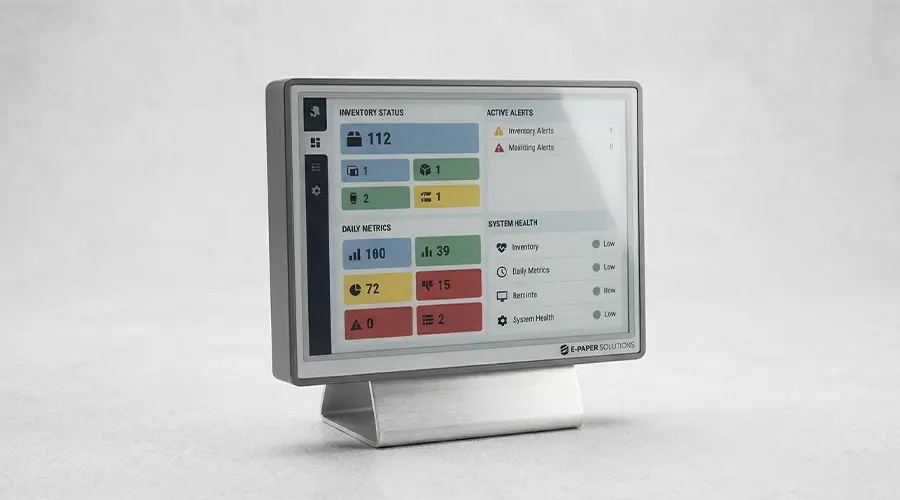
Color E-Paper displays are gaining more attention as product teams look for display solutions that combine low power consumption with stronger visual communication. In many modern projects, black-and-white screens are no longer enough. Retail labels need promotional highlighting, smart office signage needs better information hierarchy, and public-facing displays often need more visual distinction without giving up battery efficiency. That is where color E-Paper becomes highly relevant.
This selection guide is designed for buyers, engineers, OEM teams, and product managers who need practical guidance rather than theory alone. We will focus on how to choose the right color E-Paper display based on screen size, resolution, color performance, refresh behavior, and real application needs. If your project depends on balancing low power with better visual impact, this guide will help you make a more confident decision.
What Is a Color E-Paper Display?
A color E-Paper display is a low-power reflective display that presents information using multiple visible colors instead of only black and white. Like standard electronic paper technology, it is designed to reflect ambient light rather than emit light continuously. This gives it a paper-like viewing experience and makes it especially useful in bright indoor spaces and other well-lit environments.
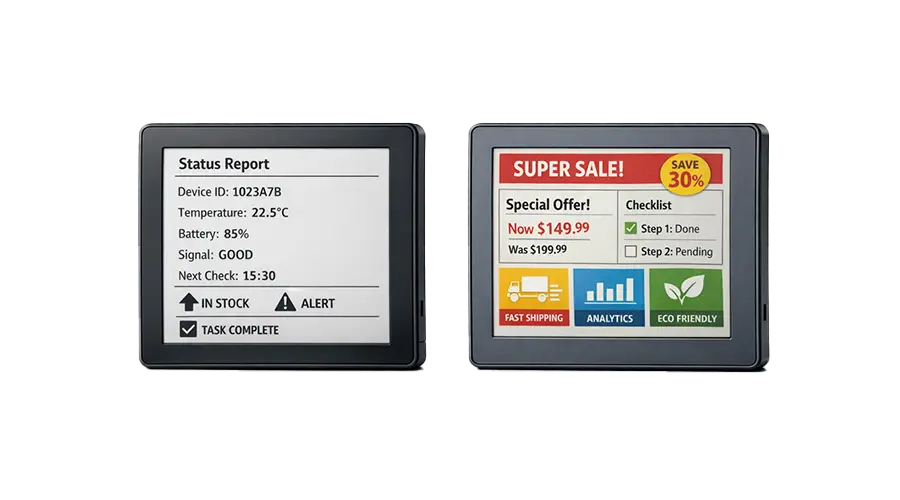
The main difference between black-and-white E-Paper and color E-Paper is not only visual appearance, but also communication capability. Black-and-white displays are highly effective for simple text, numbers, codes, and status information. Color E-Paper adds another layer of information hierarchy. It can highlight promotions, warnings, category markers, schedule status, or branded content more effectively than monochrome screens.
Depending on the panel design, color can be presented through different technical approaches such as added pigment systems, color filters, or layered structures. For most buyers and engineers, the key point is not the internal method itself, but how the final screen performs in readability, color clarity, refresh behavior, and application fit.

Key Advantages of Color E-Paper
Low Power with Richer Visual Communication
One of the strongest reasons to choose color E-Paper is that it preserves the low-power benefits of electronic paper while improving visual communication. In many applications, the display only needs power during updates, which makes it attractive for battery-powered devices that still need more than basic black-and-white output.
Better Category Highlighting and Information Hierarchy
Color helps users identify priorities more quickly. Promotions, warning states, room availability, product categories, or process labels can stand out more clearly when specific elements use contrasting colors. This is especially useful in commercial and operational environments where visual clarity improves efficiency.
Improved Retail and Signage Presentation
In retail and signage projects, color E-Paper can improve presentation quality without moving to a high-power full-motion display. It supports more attractive product labeling, stronger shelf communication, and cleaner visual separation of pricing, offers, and product details.
Good Ambient-Light Readability
Because color E-Paper remains a reflective display technology, it can perform well in bright environments where readability matters. This makes it useful in stores, offices, medical spaces, public buildings, and selected semi-outdoor conditions depending on full system design.
Common Use Cases for Color E-Paper
Color E-Paper is best understood through its practical applications. It is most valuable when low power and stronger visual emphasis need to coexist.
Electronic Shelf Labels
Retail shelf labels are one of the most common use cases. Color can help distinguish discounts, membership pricing, promotional tags, stock notices, or product categories while maintaining long battery life across large deployment volumes.
Retail Promotions
Promotional communication often depends on visual emphasis. Color E-Paper can make temporary offers, campaign labels, and highlighted messages more noticeable than black-and-white labels while still supporting energy-efficient operation.
Smart Office Signage
Meeting room panels, desk signage, visitor guidance labels, and scheduling systems can use color to show room status, departments, booking conditions, or directional hierarchy more clearly.
Healthcare Identification
In healthcare and care-related environments, color can improve distinction between information types such as patient identification, bed labels, department status, or caution indicators, while keeping the display readable and power-efficient.
Public Information Displays
Low-power public information surfaces such as timetables, notices, and location guidance panels can benefit from color where the content changes periodically but does not require full-motion graphics.
How to Choose the Right Screen Size
Screen size is one of the first and most important selection factors. The right size depends on available installation space, viewing distance, content density, and the user’s reading behavior.
Small-Size Modules for Compact Devices
Small color E-Paper modules are suitable for smart tags, electronic shelf labels, compact badges, portable devices, and small identification panels. They work best when the content is concise and the viewing distance is short.
Medium-Size Displays for Labels and Control Panels
Medium-size displays are often a practical balance between readability and installation flexibility. They are useful for larger labels, smart office signage, medical panels, and product interfaces that need more content or clearer layout separation.
Large-Size Displays for Signage and Information Boards
Large-format color E-Paper displays are better for room schedules, public information boards, commercial signage, and communication panels viewed from farther away. In these cases, size supports visibility and content structuring more than pixel count alone.
Space Constraints and Viewing Distance
Selection should always balance physical space and reading distance. A small screen with high resolution may still be difficult to read from far away, while a larger screen with moderate resolution may communicate more effectively in real use. The display should fit both the enclosure design and the expected user position.
Understanding Resolution and Pixel Density
Resolution affects how clearly the display can present text, icons, symbols, and graphic elements. In color E-Paper selection, it should be considered together with screen size rather than in isolation.
Why Resolution Matters
Higher resolution usually improves the sharpness of small text, fine graphical details, and dense layouts. This is especially important when the screen must show multiple content zones, compact product information, or structured interface elements.
Content Type and Readability
The right resolution depends heavily on the content. If the display mainly shows short text, price blocks, simple icons, or basic labels, moderate resolution may be enough. If it needs to present more detailed product descriptions, multilingual information, small symbols, or compact schedules, higher resolution becomes more valuable.
Text-Heavy vs Graphic-Heavy Applications
Text-heavy applications need clean character rendering and sufficient pixel density for readability. Graphic-heavy applications need enough resolution to preserve icon shapes, layout structure, and visual hierarchy. In both cases, the goal is not maximum specification on paper, but a display that remains clear in real viewing conditions.
Balancing Size and Clarity
A larger screen does not automatically mean better readability if the content layout is poorly matched. Likewise, a very high-resolution screen is not always necessary if the content is simple and the viewing distance is short. The best result comes from balancing screen dimensions, content density, and user distance together.
Practical rule: Choose resolution based on what users actually need to read, not only on what looks impressive in a specification sheet.
Color Performance Considerations
Color performance is a major decision factor in this category, but it needs to be evaluated in realistic terms. Color E-Paper is useful because it improves communication, not because it behaves like a video display.
Number of Colors Supported
Different color E-Paper panels support different levels of color presentation. Some are designed around limited highlight colors for practical information emphasis, while others support richer output for signage and category-based display tasks. The right choice depends on whether the application needs basic visual distinction or a broader presentation range.
Contrast and Visibility
Color is only useful if the content remains clear. Buyers should pay attention to contrast, text visibility, and the clarity of highlighted areas rather than judging the panel only by color count. In many B2B applications, strong communication value matters more than saturated visual effects.
Impact of Ambient Light
Ambient light affects how color appears on reflective displays. In bright indoor environments, color E-Paper can perform well and remain readable. In darker spaces, the viewing experience depends more on available light because the screen does not behave like a self-emissive display.
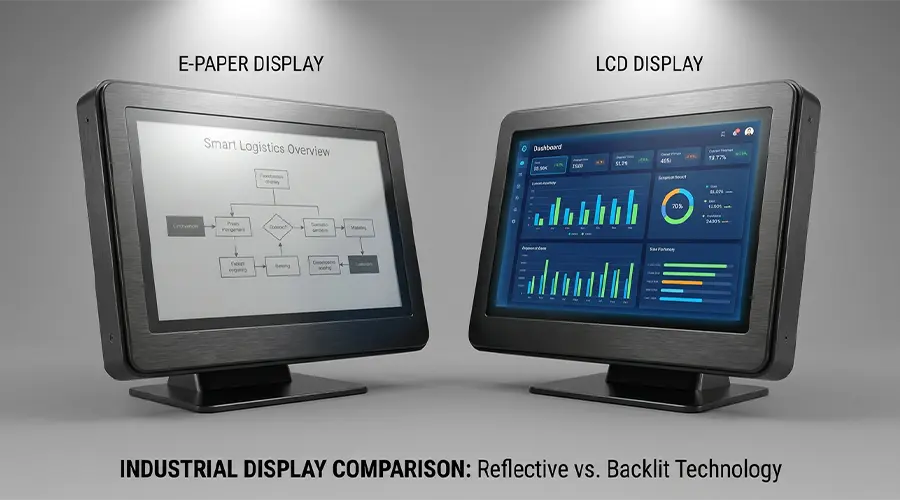
Limitations Compared with LCD or OLED
Color E-Paper is not a direct replacement for LCD or OLED in applications that require vivid multimedia color, fast transitions, or high-motion graphics. Its strength is low-power visual emphasis for static or slowly changing content. Understanding this difference helps avoid mismatched expectations during product planning.
Refresh Performance and Update Strategy
Refresh behavior is a key part of selection because it affects both user experience and system design. A color E-Paper display may look attractive in concept, but it must also match how often the information changes.
Static Content vs Periodic Updates
Color E-Paper is best for static content or periodic updates rather than continuous visual change. If your application updates prices a few times per day, changes room status occasionally, or refreshes notices on schedule, it can be a strong fit. If it must respond rapidly and continuously, another display technology may be better.
Suitability for Changing Prices, Notices, or Schedules
Many commercial and operational use cases do not need instant full-motion behavior. Retail price changes, room bookings, public notices, and smart label updates usually happen at intervals. In these cases, color E-Paper can deliver useful visual value without high power consumption.
User Expectations for Refresh Speed
Refresh speed should always be judged in the context of user expectations. If the user expects a calm information display, occasional transition behavior is acceptable. If the user expects touchscreen responsiveness, animated UI, or live graphics, slow refresh becomes a limitation.
Interface and System Integration
Display selection is not complete until the module can be integrated successfully into the product system. Electrical, mechanical, and front-surface design all affect the final result.
MCU and SPI Considerations
Many color E-Paper modules are integrated using MCU-based control and serial interfaces such as SPI. Product teams should evaluate data handling, update timing, memory requirements, power design, and controller compatibility early in development.
Driver Support
Driver maturity and development support can affect project speed just as much as the panel specification itself. Teams should confirm whether the display is supported by suitable documentation, reference code, controller resources, and integration guidance.
Front-End Cover Lens and Touch Integration
Some projects require a front cover lens, decorative surface, or touch function. These additions can affect readability, reflectivity, thickness, and overall user perception. Optical and industrial design choices should therefore be reviewed together with the display module, not afterward.
Mounting and Enclosure Design
Size, connector orientation, fastening method, protective structure, and enclosure fit all matter in OEM and custom product development. A display that works electrically but does not fit the mechanical design can still become the wrong choice in practice.
Environmental and Reliability Factors
Color E-Paper selection should also reflect the product’s long-term operating environment. Reliability depends on more than just screen appearance.
Operating Temperature
Temperature range can influence display behavior, update speed, and overall stability. Applications in industrial, logistics, or semi-outdoor settings should review environmental requirements carefully during the selection process.
Mechanical Protection
If the product will be exposed to impact risk, repeated handling, or demanding installation conditions, the display must be protected by appropriate structural design. Housing, cover material, sealing, and mounting approach all contribute to final reliability.
Indoor vs Semi-Outdoor Usage
Many color E-Paper applications are best suited for indoor commercial, healthcare, office, and industrial environments. Semi-outdoor usage may also be possible depending on enclosure design, ambient light conditions, weather protection, and operating temperature requirements.
Long-Term Deployment Concerns
In large deployments, maintenance and reliability are major factors. Battery replacement intervals, screen protection, connector stability, and mounting quality all influence long-term operating cost. The best display choice is one that remains effective not only at launch, but across the full deployment lifecycle.
How to Match a Color E-Paper Display to Your Application
The most effective way to choose a color E-Paper display is to start with the actual use case. The same panel is not ideal for every environment or every content style.
Retail
Retail applications often benefit from color because promotions, category markers, and pricing tiers need visual separation. Small and medium-size modules are common depending on shelf format and information density.
Smart Labeling
Smart labels and asset tags need compact displays with strong readability and low power draw. In these cases, the right balance between screen size, simple color emphasis, and update interval is more important than advanced graphics capability.
Industrial Status Display
Industrial projects may use color E-Paper for process status, warnings, equipment identification, and role-based visual signals. Reliability, environmental fit, and viewing distance are often more important than decorative visual quality.
Information Signage
For signage and public communication panels, larger displays and clearer content hierarchy are often the priority. In these applications, size and layout planning matter as much as color itself because the display may need to communicate from a distance.

Conclusion
Color E-Paper displays are an excellent choice when low power consumption and stronger visual emphasis need to work together. They are not designed to replace high-speed multimedia displays, but they can provide clear value in retail, signage, healthcare, smart labeling, and many OEM products where ambient-light readability and efficient power use are essential.
The right selection depends on matching the display to the real application. Screen size should align with viewing distance and installation space. Resolution should match content density and readability requirements. Color performance should be judged by practical communication value, not by unrealistic expectations. Refresh behavior should match how often the information changes. When these factors are aligned correctly, color E-Paper can become a highly effective display solution for modern low-power projects.
Looking for the Right Color E-Paper Display?
If you are sourcing color E-Paper modules for retail, office signage, healthcare, smart labeling, or OEM product development, you can build internal links here to your related collection pages or inquiry page.
Suggested internal links: Color E-Paper / Medium-Size E-Paper / Large-Format E-Paper / Custom E-Paper Modules / Contact Us
FAQ
Are color E-Paper displays full color?
Not always. Color E-Paper displays vary in how many colors they can present and how those colors appear in practice. Some are designed mainly for color highlighting, while others support richer visual output. They are generally intended for low-power information display rather than full-motion multimedia color performance.
Is color E-Paper suitable for outdoor use?
Color E-Paper can be suitable for bright environments and some semi-outdoor applications because it is reflective and readable under ambient light. However, whether it works outdoors depends on the full product design, including enclosure protection, temperature range, weather resistance, and mounting conditions.
Does color E-Paper consume more power than black-and-white E-Paper?
Power behavior depends on the specific panel design and update method, but in general color E-Paper may involve more complex update behavior than black-and-white E-Paper. Even so, it is still considered a low-power display technology compared with many continuously active screen types.
What size is best for retail labels?
The best size depends on shelf format, viewing distance, and how much information must be displayed. Small-size modules are common for standard shelf labels, while medium-size displays may be better when larger text, more product details, or stronger promotional visibility is required.
Can color E-Paper play video?
Color E-Paper is generally not suitable for video playback or fast animation. It is designed for static or slowly changing information where low power and readability are more important than motion performance.
How do I choose the right color E-Paper module for my project?
Start by reviewing application type, viewing distance, content density, screen size, resolution, color needs, refresh frequency, interface requirements, and environmental conditions. The best module is the one that fits the real use case rather than simply offering the highest specification on paper.

Hinterlasse einen Kommentar
Diese Website ist durch hCaptcha geschützt und es gelten die allgemeinen Geschäftsbedingungen und Datenschutzbestimmungen von hCaptcha.