
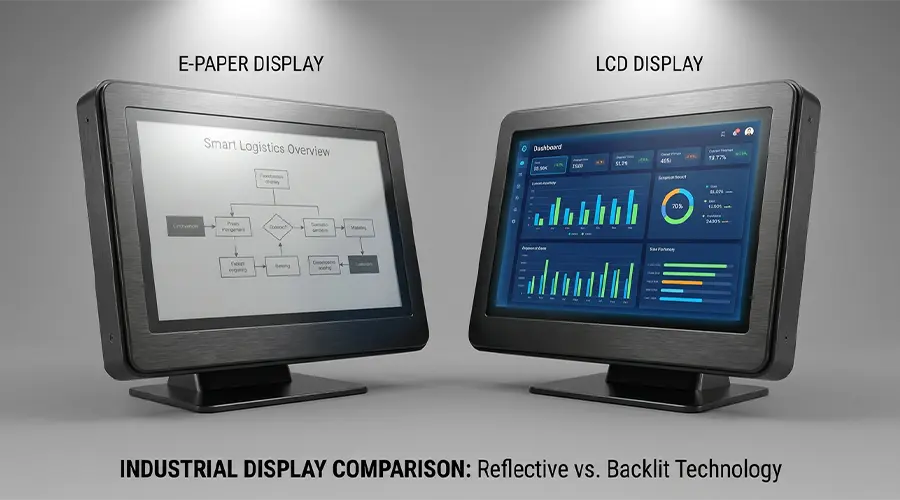
Choosing between E-Paper and LCD is a common challenge in product development, especially for devices that must balance power consumption, readability, refresh performance, and long-term usability. Both technologies are widely used, but they serve different purposes. In some products, E-Paper is the ideal solution because it offers ultra-low power consumption and strong visibility in bright light. In others, LCD is the better option because it supports faster refresh, richer graphics, and more dynamic user interaction.
This comparison matters for engineers, sourcing teams, OEM buyers, and product managers because the wrong display choice can affect battery life, user experience, maintenance cost, and system design. In this guide, we will compare E-Paper vs LCD across key performance factors such as power usage, sunlight readability, refresh speed, color capability, and application fit, so you can choose the right low-power display solution for your project.
What Is an E-Paper Display?
An E-Paper display, also known as an electronic paper display, is a reflective display technology designed to mimic the appearance of ink on paper. Instead of emitting light like many conventional screens, E-Paper reflects ambient light. This makes it highly readable in bright environments and especially suitable for applications where glare reduction and paper-like viewing comfort are important.
One of the defining strengths of E-Paper is its ultra-low power behavior. In many implementations, power is mainly used when the image changes. Once text, numbers, or graphics are updated, the screen can continue showing the content without continuous power for image retention. This makes E-Paper especially useful in battery-powered products that display static or slowly changing information.
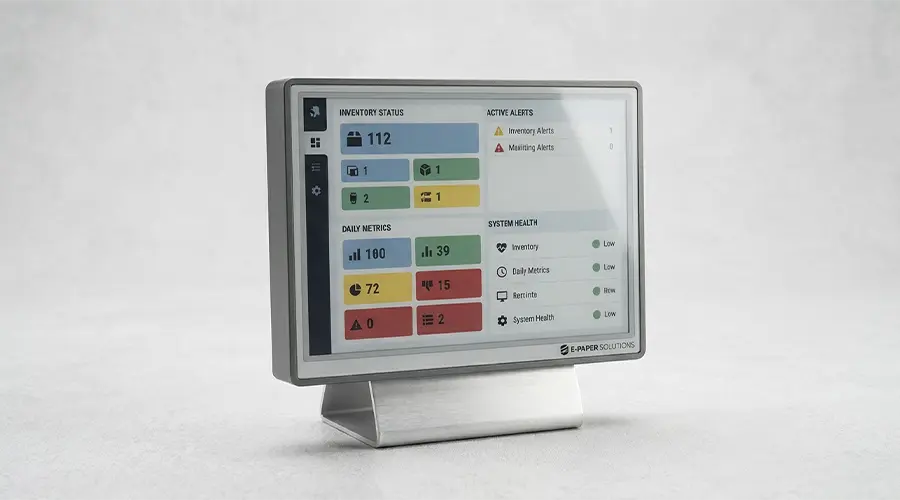
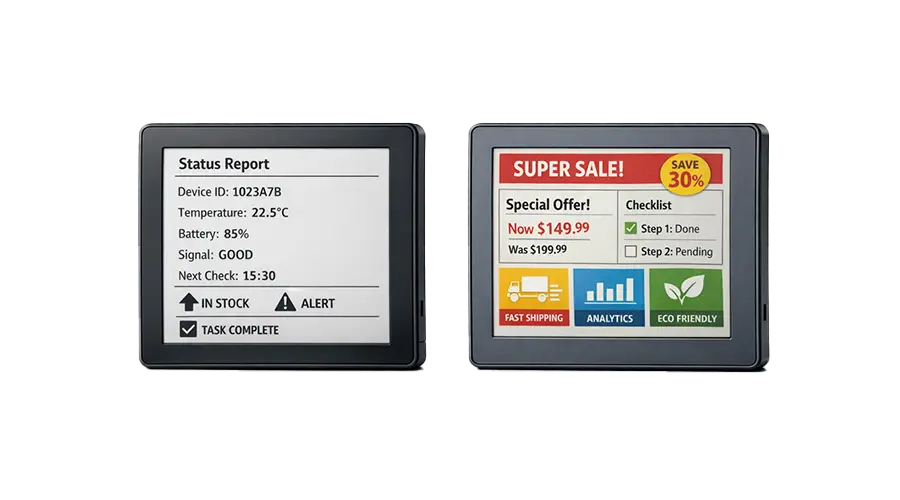
E-Paper is commonly used in electronic shelf labels, smart tags, industrial status displays, healthcare labels, office signage, handheld low-power devices, and other applications where long battery life and high readability matter more than animation or video.

What Is an LCD Display?
LCD stands for liquid crystal display. It works by controlling liquid crystal molecules to regulate how light passes through the display panel. Unlike E-Paper, LCD does not rely on reflected ambient light alone. Most LCD modules depend on a backlight to make the screen visible, especially indoors or in low-light conditions.
LCD technology is widely used because it supports fast refresh rates, dynamic graphics, colorful interfaces, and real-time interaction. It is a standard choice for consumer electronics, industrial instruments, control panels, handheld terminals, home appliances, and many products that need responsive screen behavior.
In practical terms, LCD is often better suited for applications that require moving graphics, more frequent updates, richer UI design, or continuous user interaction. However, because it typically depends on active operation and backlighting, its system power requirements may be higher than E-Paper in many low-refresh applications.
E-Paper vs LCD: Key Differences at a Glance
The most important difference between E-Paper and LCD is not simply the display panel itself, but the role each technology plays in a product. E-Paper is optimized for static, readable, low-power information display. LCD is optimized for dynamic visual communication, responsive interfaces, and richer color presentation.
| Feature | E-Paper | LCD |
|---|---|---|
| Display Principle | Reflective, paper-like display using ambient light | Light-modulating display typically requiring a backlight |
| Power Consumption | Very low for static or low-refresh content | Usually higher because of backlight and active operation |
| Sunlight Readability | Excellent in bright light | Depends on panel brightness, optical design, and anti-glare treatment |
| Refresh Speed | Slow | Fast |
| Color Performance | Limited compared with LCD | Rich color and better visual flexibility |
| Motion / Video Capability | Not ideal for video or smooth animation | Suitable for animation, dynamic UI, and video |
| Mechanical Integration | Useful for ultra-low-power information interfaces and custom label-type products | Common in broad product categories with mature integration ecosystems |
Selection logic: If your display mostly shows stable information and battery life is critical, E-Paper is often the better fit. If your product needs fast graphics, continuous interaction, or rich color, LCD is usually the stronger choice.
Power Consumption Comparison
Power consumption is one of the main reasons teams compare E-Paper vs LCD. In low-power display design, this single factor can influence battery size, maintenance frequency, enclosure design, system cost, and product lifetime.
Why E-Paper Is Ideal for Battery-Powered Static Content
E-Paper is especially effective when the displayed content changes only occasionally. Since power is mainly required during updates, devices such as electronic shelf labels, nameplates, warehouse tags, and scheduling signs can operate for long periods with minimal energy use. This makes E-Paper highly attractive for products that need multi-month or even multi-year battery life.
Why LCD May Consume More in Always-On Viewing
LCD panels usually rely on a backlight to remain visible, and they also need active driving during operation. Even when the displayed content does not change often, the screen may still consume power to maintain visibility. For always-on applications, this can create a significant energy difference compared with E-Paper.
Battery Life Implications
In portable or remote devices, the display choice can directly affect battery replacement cycles and field maintenance. If minimizing service visits and maximizing battery life are top priorities, E-Paper often provides system-level advantages beyond the panel alone. However, if the product needs continuous interaction or dynamic visuals, LCD may justify its higher power use.
Readability and Viewing Comfort
Readability is another major factor in display selection, especially for products used in retail, industrial, healthcare, public spaces, or semi-outdoor environments.
Reflective Display Advantages
E-Paper is a reflective display, so it becomes easier to read as ambient light increases. This is a major advantage in bright indoor spaces and sunlight-exposed conditions. For labels, notices, schedules, and information panels, this behavior often creates a more natural reading experience.
Indoor and Outdoor Visibility
In strong ambient light, E-Paper usually performs very well. LCD visibility in bright conditions depends heavily on brightness level, optical bonding, anti-reflective treatment, and enclosure design. Some high-brightness LCD solutions are engineered for outdoor use, but they typically require more power and more system consideration.
Eye Comfort in Prolonged Viewing
Because E-Paper has a paper-like appearance and does not rely on constant emitted light in the same way as backlit displays, many users find it more comfortable for reading text-based information over time. This can be valuable in signage, medical data presentation, desk labels, and document-like interfaces.
Backlight Pros and Cons
LCD’s backlight is both a strength and a tradeoff. It makes the display usable in dark environments and supports vivid UI design, but it can also increase power draw and sometimes reduce comfort in bright-light or long-reading scenarios if the design is not optimized.
Refresh Rate and User Interaction
Refresh speed is one of the clearest dividing lines between E-Paper and LCD. It often determines whether the technology is appropriate for the product at all.
E-Paper for Static or Low-Refresh Data
E-Paper is best suited for information that remains stable for extended periods or changes at controlled intervals. Prices, product labels, schedules, IDs, room occupancy status, and equipment states are strong examples. In these scenarios, refresh speed is less important than readability and power efficiency.
LCD for Dynamic User Interfaces
LCD is designed for frequent updates, responsive touch interaction, moving graphics, and real-time screen transitions. If your product includes animated menus, frequent status changes, live dashboards, or interactive control functions, LCD is usually the more practical option.
When Refresh Speed Becomes Critical
If the user expects immediate visual response, rapid navigation, or media-like behavior, slow refresh becomes a limitation. In these cases, LCD offers a better experience. If the user mainly needs to read stable information, E-Paper may still be the stronger display choice overall.
Color Performance and Visual Experience
Color quality and visual style influence both user experience and brand presentation. The right choice depends on whether the product prioritizes clear information delivery or richer visual communication.
LCD Color Richness and Motion Performance
LCD supports stronger color rendering, more vivid graphics, smoother gradients, and much better motion performance than E-Paper. This makes it a strong fit for consumer interfaces, control displays, multimedia terminals, and products where visual richness matters.
E-Paper’s Practical Role in Low-Power Information Display
E-Paper is not meant to compete directly with LCD in color intensity or motion capability. Its value lies in readable, low-power, information-first presentation. Even color E-Paper is usually chosen for communication clarity, category emphasis, or label enhancement rather than entertainment-grade visual output.
When Color Quality Matters Most
If your application depends on vivid branding, graphics-heavy dashboards, photos, or fluid user interaction, LCD has a clear advantage. If the main goal is low power and stable display of essential information, E-Paper may still be the better overall solution even with more limited color capability.
Environmental and Use-Case Considerations
Display selection should always be based on the actual environment and use case, not only on theoretical specifications.
Retail Shelf Labels
E-Paper is often the better choice for electronic shelf labels because pricing and product information update occasionally rather than continuously. Long battery life and excellent readability are major advantages in retail deployment.
Industrial Control Displays
Industrial products vary widely. If the screen only needs to show stable machine status, warning text, or identification information, E-Paper may work well. If the interface needs dynamic controls, live data, or rapid user feedback, LCD is generally more suitable.
Smart Home Panels
Minimalist smart home interfaces, room status panels, and battery-powered companion displays can benefit from E-Paper. More interactive control panels with touch menus, animations, or frequent screen changes usually favor LCD.
Handheld Devices
For handheld products focused on reading, status checking, or low-power portability, E-Paper offers clear benefits. For handheld terminals requiring color UI, scanning feedback, or fast human-machine interaction, LCD is often preferred.
Outdoor Signage
If the signage content is mostly static and sunlight readability is essential, E-Paper can be very effective. If the sign needs bright night visibility, motion graphics, or rich color output, LCD-based solutions may be more practical despite higher power demand.

Cost and Product Design Considerations
Comparing display cost is not just about module pricing. Teams also need to consider total system cost, power architecture, long-term maintenance, and deployment scale.
Module Cost vs System Cost
A display module with a lower purchase price does not always create the lower total product cost. For example, if a higher-power display requires a larger battery, more charging support, more frequent battery replacement, or more thermal and optical design work, overall system cost can increase.
Battery and Power Architecture Impact
E-Paper may reduce battery requirements in low-refresh systems, which can simplify enclosure size, service planning, and installation flexibility. LCD may require more attention to backlight power, active operation time, and charging or power-supply design.
Maintenance and Long-Term Deployment Factors
For large rollouts such as smart retail, warehousing, office signage, or distributed devices, maintenance cost becomes a major decision factor. Fewer battery changes and lower service frequency can make E-Paper attractive over the long term. LCD may still be the right choice if its functional advantages are necessary for the product experience.
When to Choose E-Paper
E-Paper is often the best choice when the product needs:
- Static or slowly changing information display
- Long battery life and minimal power draw
- Strong readability in bright indoor light or sunlight
- A paper-like viewing experience for text-heavy content
- Low-maintenance deployment across many devices
- A calm, information-first interface rather than animation-heavy UI
Typical examples include electronic shelf labels, smart tags, desk signs, room booking displays, medical labels, warehouse identifiers, and battery-powered IoT companion screens.
When to Choose LCD
LCD is often the better choice when the product needs:
- Real-time graphics and fast visual response
- Frequent screen updates and interactive menus
- Video, animation, or dynamic dashboard behavior
- Rich color interfaces and more vivid presentation
- Operation in low-light conditions using a backlight
- General-purpose display flexibility across many UI types
Typical examples include industrial control panels, handheld terminals, home appliance displays, medical equipment interfaces, instrument screens, and consumer-facing user interfaces.
Conclusion
There is no universal winner in the E-Paper vs LCD decision. The better display depends entirely on the product’s goals, power architecture, operating environment, update behavior, and user expectations. If your priority is low power, sunlight readability, and stable display of mostly static information, E-Paper is often the stronger solution. If your priority is speed, rich color, dynamic graphics, and responsive interaction, LCD is usually the better fit.
For engineering and sourcing teams, the best selection method is to begin with the use case, not the technology label. Define how often the screen updates, where the device will be used, how much power is available, what kind of visual experience users expect, and what maintenance model the product must support. Once those factors are clear, it becomes much easier to choose the right low-power display solution with confidence.
Need Help Choosing Between E-Paper and LCD?
If you are comparing display technologies for retail, industrial, smart home, medical, handheld, or OEM applications, you can build internal links here to your category pages, custom display pages, or inquiry page.
Suggested internal links: E-Paper Collection / Small-Size E-Paper / Medium-Size E-Paper / Sunlight-Readable Display Solutions / Contact Us
FAQ
Is E-Paper better than LCD?
E-Paper is better than LCD in applications that require ultra-low power consumption, strong sunlight readability, and stable display of static information. LCD is better when the product needs fast refresh, dynamic graphics, rich color, or continuous user interaction. The better choice depends on the application rather than a single technical specification.
Does LCD always consume more power?
In many low-refresh applications, LCD usually consumes more power because it depends on active operation and often a backlight. However, actual power usage depends on the screen size, brightness setting, duty cycle, and system design. In dynamic applications, LCD may still be the right tradeoff despite higher energy demand.
Which is better for outdoor visibility?
E-Paper is generally better for sunlight readability because it is a reflective display. LCD can also be used outdoors, but it usually requires high brightness, optical optimization, and higher power consumption to maintain strong visibility in bright light.
Can E-Paper replace LCD in industrial products?
In some industrial products, yes. If the display mainly shows stable status information, labels, IDs, or low-refresh operational data, E-Paper can be a strong alternative. If the industrial interface needs fast response, live graphics, or interactive control functions, LCD is usually more appropriate.
Which display is better for battery-powered devices?
For battery-powered devices that show static or infrequently changing information, E-Paper is often the better choice because of its low power behavior. For battery-powered products that require color UI, quick refresh, or continuous interaction, LCD may still be necessary even though it usually consumes more power.
How should I choose between E-Paper and LCD for a new product?
Start by evaluating update frequency, power budget, viewing environment, color needs, user interaction requirements, and maintenance expectations. If the product is information-first and low-power focused, E-Paper is often ideal. If it is graphics-driven and interaction-heavy, LCD is typically the better choice.

Leave a comment
This site is protected by hCaptcha and the hCaptcha Privacy Policy and Terms of Service apply.