Is OLED Burn-in Still an Issue in 2025? The Ultimate Guide to Screen Longevity

Is OLED Burn-in Still an Issue in 2025? The Ultimate Guide to Screen Longevity


Last Updated: 2025 | Reading Time: 18 Minutes

The visual fidelity of Organic Light-Emitting Diode (OLED) technology is undisputed. With infinite contrast ratios, pixel-perfect lighting, and near-instant response times, it represents the pinnacle of modern display technology. However, for over a decade, one persistent shadow has loomed over this innovation: the fear of OLED burn-in. As we move deeper into 2025, prospective buyers are asking a critical question: Is this screen degradation still a deal-breaker, or have engineering marvels finally rendered it a relic of the past?

This is not just a simple "yes or no" article. This is a comprehensive, 5,000-word deep dive into the physics, chemistry, and real-world durability of modern panels. We will dissect the molecular differences between WOLED and QD-OLED, analyze the latest torture test data, and provide an exhaustive maintenance guide to ensure your investment lasts for years. Whether you are a hardcore gamer, a professional video editor, or a home cinema enthusiast, this guide will separate the myths from the reality of permanent image retention.

1. What is OLED Burn-in vs. Image Retention?

To have an intelligent conversation about display longevity, we must first establish a precise technical definition. There is significant confusion in the consumer market regarding what is OLED burn-in vs. image retention. These two terms describe visual anomalies, but their underlying causes, duration, and reversibility are fundamentally different.

The Phenomenon of Temporary Image Retention

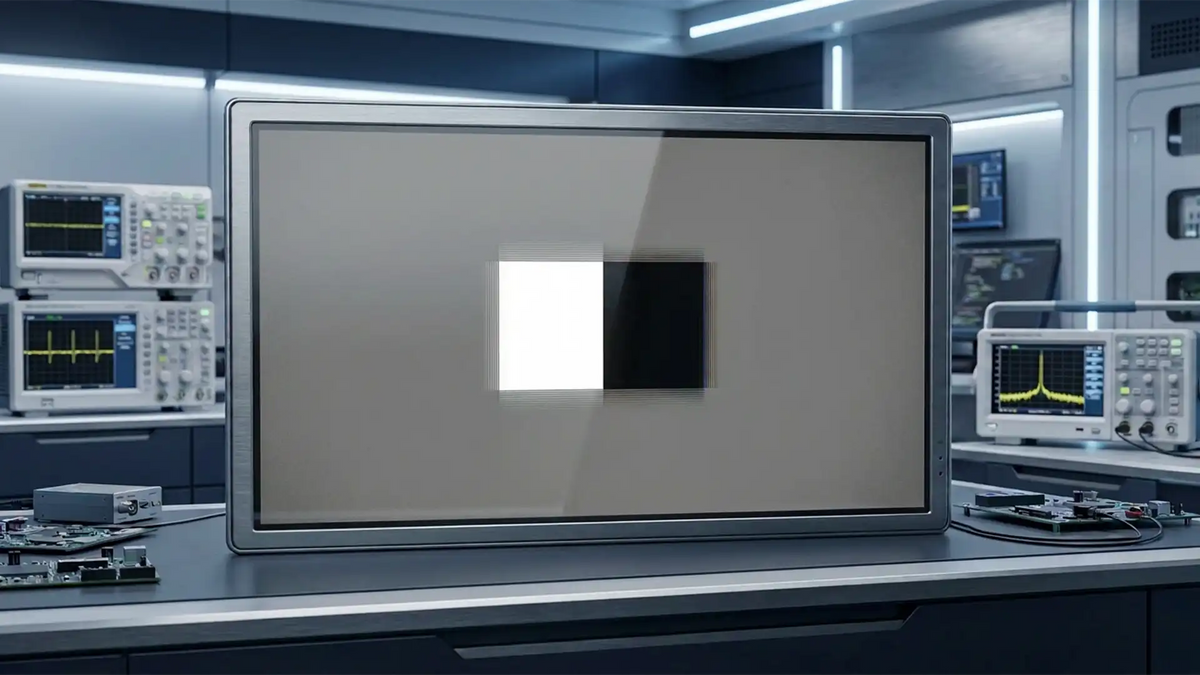
Image retention, often called "ghosting," is a temporary condition. It occurs when the driving transistors (TFTs) behind the pixels retain a residual electrical charge after displaying a bright, static object for an extended period. For example, if you close a bright white window, you might see a faint outline of it on a grey background for a few minutes.

Crucially, this is not damage. The organic material has not degraded. The pixels simply need time to discharge and return to a neutral state. In the context of what is OLED burn-in vs. image retention, retention is a fleeting annoyance that resolves itself through normal usage or a short standby cycle.

The Reality of Permanent Burn-in

Burn-in is entirely different. It is the result of differential aging of the organic subpixels. Every OLED pixel is a consumable resource; it loses luminance efficiency the longer it is used. If all pixels age at the same rate, the screen simply gets dimmer over 10 years, which is unnoticeable. However, burn-in happens when specific areas (like a red "Breaking News" banner) age significantly faster than the surrounding area.

When you ask what is OLED burn-in vs. image retention, remember this: Burn-in is physical, chemical degradation. The organic compounds in that specific area have lost their ability to emit light as brightly as their neighbors. This creates a permanent dark shadow or color shift that cannot be "fixed" by software, only mitigated by panel replacement.

Technical Insight: The "Mura" Effect

Sometimes, users confuse burn-in with "Mura" (clouding) or vertical banding, which are manufacturing defects visible in near-black scenes. Unlike burn-in, which develops over time based on your content, Mura is usually present from day one and is a result of panel uniformity issues, not organic decay.

2. The Main Causes of OLED Screen Degradation

Why do these advanced displays fail? Understanding the main causes of OLED screen degradation requires looking at the microscopic level. Unlike LCDs, which use stable inorganic LED backlights, OLEDs rely on electroluminescent organic materials that are sensitive to environmental and operational stressors.

Thermal Accumulation (Heat)

Heat is the number one enemy of OLED longevity. The chemical reaction that produces light also produces waste heat. When pixels are driven hard to produce HDR highlights (often exceeding 1000 nits in 2025 models), the temperature rises. High heat accelerates the breakdown of the chemical bonds within the organic emissive layer.

Consequently, poor thermal management is one of the main causes of OLED screen degradation. Monitors with inadequate ventilation or those placed in direct sunlight are far more likely to develop permanent image retention than those in cool, climate-controlled environments.

Static High-Luminance Content

The second major factor is static content. When a specific cluster of pixels displays a static, bright color (like a yellow health bar in a video game or a white taskbar in Windows) for hundreds of hours, those pixels work disproportionately harder than the rest of the screen. This uneven wear leads to the "shadow" effect.

The "Blue" Subpixel Inefficiency

Historically, blue organic materials have been the least efficient and least stable compared to red and green. To achieve a balanced white point, the blue subpixels often have to be driven at higher voltages. This increased electrical stress makes the blue channel fail first, leading to a yellow/green tint over time. This inherent material weakness remains one of the main causes of OLED screen degradation, although modern engineering (like Deuterium stabilization) is rapidly mitigating this.

3. Advanced Anti-Burn-in Technologies in 2025

If you are worried about buying an OLED today, take comfort in the fact that manufacturers have implemented advanced anti-burn-in technologies in 2025 that were non-existent just a few years ago. The leap from "Gen 1" panels to the current "Gen 3" and beyond is massive.

Let's examine the multi-layered defense systems protecting modern displays:

Technology Mechanism Impact on Longevity
Deuterium-Based Stabilization Replacing Hydrogen with Deuterium (a heavier isotope) in the blue organic compounds creates stronger chemical bonds that are more resistant to heat and electrical stress. Significantly extends the lifespan of the fragile blue subpixels.
Dedicated Heatsinks Physical metal plates or graphene layers bonded to the back of the panel to passively wick heat away from the organic layers. Crucial for sustaining high brightness without accelerating degradation.
Micro Lens Array (MLA) Billions of microscopic lenses direct light toward the user that would otherwise be lost internally. This allows the panel to be brighter without driving the pixels harder. Increases efficiency by up to 20%, reducing the electrical load.
AI-Driven Logo Detection Real-time processors analyze the image to identify static elements (HUDs, logos) and selectively dim only those small areas. One of the most effective advanced anti-burn-in technologies in 2025 for gamers and news watchers.
Pixel Orbiting / Shift The entire image is shifted by a few pixels periodically. This ensures the border between a bright and dark object is never on the exact same subpixel for too long. Prevents hard-edge burn-in from window borders or frames.

These advanced anti-burn-in technologies in 2025 work in harmony. While the heatsink manages the temperature, the AI manages the voltage, and the Deuterium strengthens the material itself. This "defense in depth" strategy is why warranties have expanded from 1 year to 3 years.

4. WOLED vs. QD-OLED Lifespan Comparison

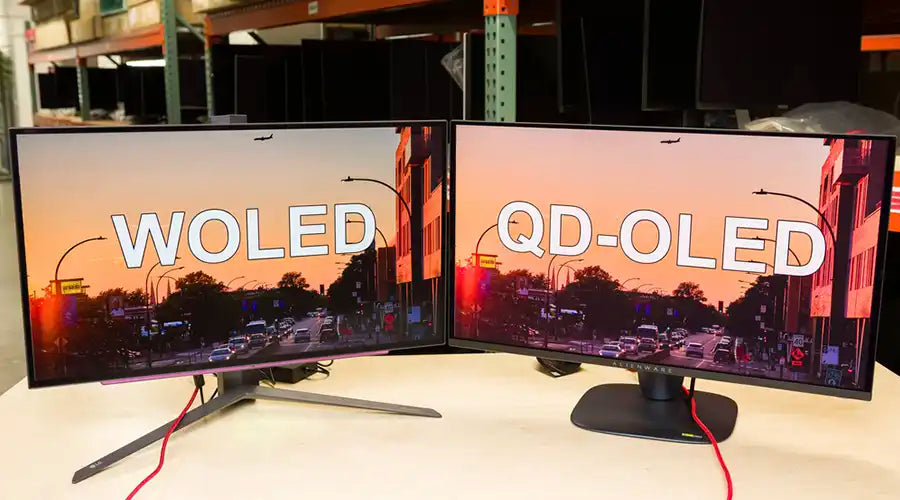
The market is currently split between two dominant technologies: LG Display's WOLED (White OLED) and Samsung Display's QD-OLED (Quantum Dot OLED). A WOLED vs. QD-OLED lifespan comparison is essential for buyers trying to decide between models like the LG C-Series and the Samsung S-Series or Alienware monitors.

WOLED Architecture (The Veteran)

WOLED uses a White subpixel in addition to Red, Green, and Blue (WRGB). The white subpixel is unfiltered and is used to boost brightness. Because the white subpixel takes the heavy lifting during bright scenes, the colored organic materials are spared from excessive stress. In a direct WOLED vs. QD-OLED lifespan comparison, WOLED has historically been considered safer for content with large areas of bright white (like web browsing or document editing) because of this dedicated white channel.

QD-OLED Architecture (The Challenger)

QD-OLED uses a pure Blue OLED backlight for all pixels, with Quantum Dot layers converting that blue light into Red and Green. This results in purer colors and higher color volume. Early Gen 1 QD-OLEDs showed signs of burn-in faster than WOLEDs in torture tests. However, Gen 3 QD-OLED panels utilize advanced AI thermal mapping and improved blue materials. While they still lack a dedicated white subpixel, their efficiency has improved dramatically.

The Verdict

Current data suggests that for mixed usage, the gap is closing. However, in a strict WOLED vs. QD-OLED lifespan comparison, WOLED still holds a slight theoretical advantage for longevity in high-brightness white scenarios, while QD-OLED offers superior color saturation. For 99% of users, both technologies are now durable enough for 5+ years of normal use.

5. Risk Analysis: Gaming vs. Productivity

Not all usage patterns are created equal. The risk of burn-in is directly proportional to what you display. We must categorize the risk based on user behavior.

Scenario A: The Hardcore Gamer (Medium Risk)

Gamers often worry about HUDs (Heads Up Displays)—health bars, ammo counters, and mini-maps. While these are static, modern games often have dynamic HUDs or transparency options. Furthermore, games are generally varied in content. With features like "Logo Luminance Adjustment" set to High, the risk for gamers is manageable. The greater risk comes from playing only one game (e.g., 2,000 hours of FIFA or Overwatch exclusively).

Scenario B: The Media Enthusiast (Low Risk)

If you use your OLED primarily for movies and streaming, your risk is near zero. Video content is constantly moving. The only potential issue is "letterboxing" (black bars) in 21:9 movies on a 16:9 screen. Over time, the center pixels age while the black bar pixels do not, potentially leading to uneven aging. However, most modern TVs have pixel cleaning cycles that effectively smooth out these differences.

Scenario C: The Productivity/Office Worker (High Risk)

This is the danger zone. Desktop operating systems are filled with static elements: the Windows Taskbar, the macOS Menu Bar, browser tabs, and window borders. Using an OLED monitor for 8 hours a day of Excel and Word is the fastest way to induce burn-in. If your primary workflow involves static white backgrounds with black text, OLED may not be the ideal choice unless you are diligent about hiding static elements.

6. Essential Tips to Prevent OLED Burn-in

Owning an OLED requires a slight shift in habits. By following these essential tips to prevent OLED burn-in, you can essentially "baby" your panel without compromising your experience. These are best practices derived from years of user testing.

Crucial Rule: Never unplug your OLED TV or monitor immediately after turning it off. When in standby, the screen runs "compensation cycles" to measure pixel voltage and correct irregularities. Unplugging it interrupts this vital maintenance process.
  • Embrace Dark Mode: Since OLED pixels turn off completely to render black, using Dark Mode in Windows, macOS, Chrome, and Office apps drastically reduces the load on the power supply and the pixels. This is arguably the most effective of all essential tips to prevent OLED burn-in.
  • Auto-Hide Taskbars: Configure your OS to automatically hide the taskbar and dock. This removes the most persistent static element from your screen.
  • Wallpaper Rotation: Do not use a bright, static wallpaper. Use a folder of wallpapers that rotates every 15 minutes, or use a "Live Wallpaper" (like Wallpaper Engine) that is constantly in motion.
  • Reduce SDR Brightness: You do not need 100% brightness for reading emails. Calibrate your SDR (Standard Dynamic Range) brightness to a comfortable level (e.g., 120-150 nits). Save the maximum brightness capabilities for HDR content where it really matters.
  • Desktop Icon Management: Hide desktop icons or shuffle them occasionally. A static "Recycle Bin" icon in the corner for 3 years will eventually leave a mark.
  • Enable Manufacturer Protections: Ensure features like "Screen Move," "Logo Dimming," and "Pixel Shift" are enabled in the OSD (On-Screen Display) menu.

7. The Future: Tandem OLED and PHOLED

The industry is not resting on its laurels. Two upcoming technologies promise to solve the burn-in equation permanently.

Tandem OLED Structures

Already seen in the automotive industry and the latest iPad Pro, Tandem OLED stacks two layers of organic emissive material on top of each other. This allows the screen to achieve the same brightness while running each layer at half the electrical current. By halving the stress, you theoretically double (or quadruple) the lifespan. We expect this to migrate to monitors and TVs soon.

Blue PHOLED (Phosphorescent OLED)

Currently, red and green OLEDs use efficient phosphorescent material (100% internal efficiency), while blue uses inefficient fluorescent material (25% efficiency). Universal Display Corporation (UDC) is on the verge of commercializing Blue PHOLED. Once the blue subpixel becomes as efficient as red and green, the heat generation will plummet, and the primary cause of burn-in will be largely neutralized.

8. Frequently Asked Questions (FAQ)

Does the 3-year warranty actually cover burn-in?

In 2025, the landscape has changed. Major brands like Dell (Alienware), Corsair, MSI, and ASUS explicitly state that their 3-year OLED warranties cover "OLED Burn-in." However, LG Electronics (for TVs) typically covers panel defects but may require specific premium protection plans for burn-in coverage depending on the region. Always read the fine print: some warranties are void if you use the monitor for "commercial uses" or disable safety features.

Is it safe to buy a used or "Open Box" OLED?

Buying used OLEDs is risky. You do not know if the previous owner ran the screen at 100% brightness on a static news channel for 500 hours. If you must buy used, check the "Total Power On Hours" in the service menu and run a full-screen color slide test (Red, Green, Blue, White, Magenta) to look for shadows before keeping it.

How often should I run the "Pixel Refresher"?

There are two types of refreshers. The short cycle runs automatically after 4 hours of use when the screen enters standby; let this happen naturally. The long cycle (often taking 1 hour) is a deep cleaning process. Do not run the long cycle manually every week. It essentially "levels down" the voltage of the pixels to match the most degraded ones. Only run the deep cleaning cycle when prompted by the TV/Monitor (usually every 500-2000 hours) or if you see visible image retention that won't go away.

Can burn-in happen within a few months?

With modern panels (2023-2025 models), burn-in within months is extremely rare and usually indicates a defective panel or extreme abuse (e.g., store display mode running 24/7). For a typical home user, visible degradation is unlikely to appear before the 3-5 year mark.


Disclaimer: While OLED technology has matured significantly, organic materials are subject to wear. The longevity estimates in this article are based on typical consumer usage patterns and current technological standards as of 2025.

Leave a comment

This site is protected by hCaptcha and the hCaptcha Privacy Policy and Terms of Service apply.

Blog posts

View all
Beyond Standard: The Engineering Case for Custom OLED Modules

Beyond Standard: The Engineering Case for Custom OLED Modules

  A Comprehensive White Paper on Industrial HMI Reliability, Physics, and Supply Chain Strategy Executive Abstract: The transition from passive LCD to active OLED technology in industrial ...

Foldable and Rollable OLEDs: The Evolution from Concept to Durability

Foldable and Rollable OLEDs: The Evolution from Concept to Durability

  An in-depth analysis of the engineering breakthroughs powering the next generation of consumer electronics. Table of Contents 1. Introduction: The Shift to Flexible Forms 2. The Mechanics o...

Is OLED Burn-in Still an Issue in 2025? The Ultimate Guide to Screen Longevity

Is OLED Burn-in Still an Issue in 2025? The Ultimate Guide to Screen Longevity

  Last Updated: 2025 | Reading Time: 18 Minutes The visual fidelity of Organic Light-Emitting Diode (OLED) technology is undisputed. With infinite contrast ratios, pixel-perfect lighting, and ne...